
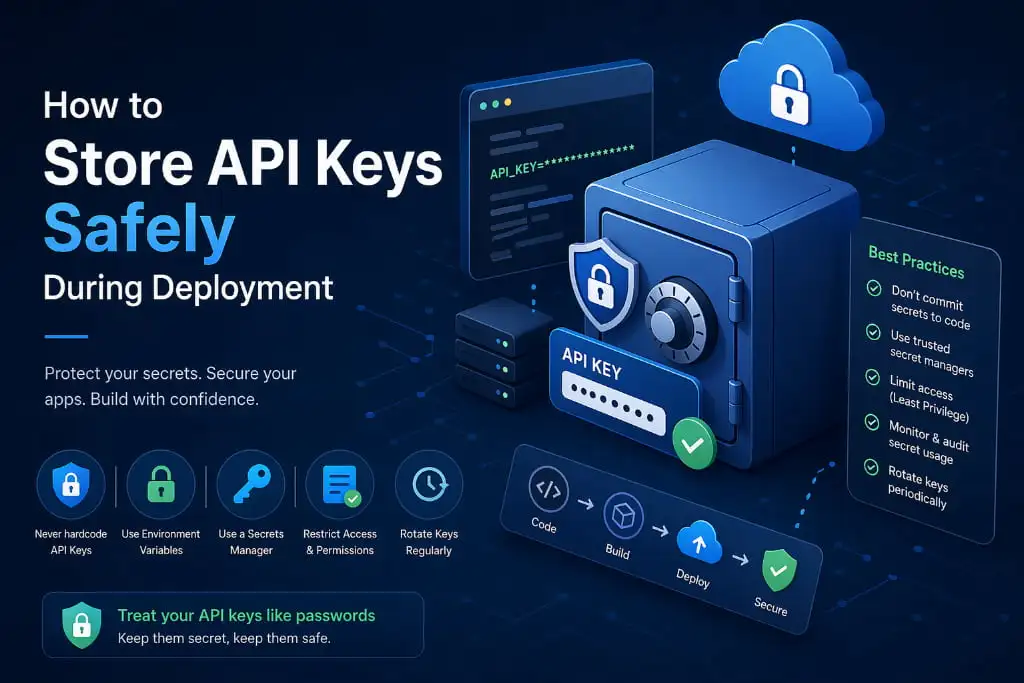
You pushed your code. The deployment went live. Everything looks perfect — until someone emails you: “Hey, I found your AWS secret key on GitHub.”
Your stomach drops.
This is not a horror story. This happens to real developers, at real companies, every single day. And the worst part? It is almost always completely avoidable. If you are serious about secure project deployment, storing API keys correctly is not optional — it is non-negotiable.
Let’s fix this right now.
Why API Keys Are Your Deployment’s Biggest Liability
API keys are the passwords to your most critical services — Stripe, AWS, Twilio, OpenAI, SendGrid. Expose them during project deployment, and you hand attackers a skeleton key to your infrastructure.
Here is what happens when an API key leaks:
- Your cloud bill skyrockets overnight (attackers spin up crypto miners)
- Customer data gets compromised
- Your app goes dark while you scramble to rotate credentials
- You spend the next week explaining to your clients what went wrong
The scary truth? Most leaks don’t happen because of hacking. They happen because a developer hardcoded a key directly into the source code, committed it to Git, and deployed it. Game over.
Mistake #1: Hardcoding Keys Directly in Your Code
This is the number one sin of project deployment.
# ❌ NEVER do this
api_key = “sk-live-abc123yoursecretkeyhere”
The moment this hits your repository — even a private one — it is a ticking time bomb. Git history is forever. Someone will clone it. Someone will fork it. A misconfigured permission will make it public.
The fix: Never, ever put a raw API key inside your source code. Full stop.
The Right Way: Environment Variables
Environment variables are the gold standard for managing secrets during project deployment. Instead of baking keys into your code, you reference them as variables that exist outside your codebase.
# ✅ Do this instead
import os
api_key = os.environ.get(“STRIPE_SECRET_KEY”)
Your key lives in the server environment, not in your Git history. If someone clones your repo, they get the code — not the secrets.
How to set them on popular platforms:
- Linux/Mac (local): export STRIPE_SECRET_KEY=your_key_here
- Heroku: heroku config:set STRIPE_SECRET_KEY=your_key_here
- AWS EC2: Use Parameter Store or set in your launch configuration
- Vercel / Netlify: Add them directly in your project dashboard under “Environment Variables”
Use a .env File — But Never Commit It
For local development, a .env file is your best friend. It keeps all your keys in one place and loads them automatically.
STRIPE_SECRET_KEY=sk_live_abc123
AWS_ACCESS_KEY=AKIAIOSFODNN7EXAMPLE
SENDGRID_API_KEY=SG.xxxxxxxxxx
The critical rule: Add .env to your .gitignore immediately.
# .gitignore
.env
.env.local
.env.production
A .env.example file (with fake placeholder values) is perfectly safe to commit — it shows your team what keys are needed without exposing the real ones.
Level Up: Use a Secrets Manager
For production project deployment, environment variables alone might not be enough. That’s where dedicated secrets management tools come in.
Top options:
- AWS Secrets Manager — Rotates keys automatically, integrates natively with AWS services
- HashiCorp Vault — Open-source, powerful, works across any cloud
- Azure Key Vault — Perfect if you’re in the Microsoft ecosystem
- Google Secret Manager — Best choice for GCP deployments
These tools encrypt your secrets at rest and in transit, control who can access what, and log every single access attempt. For enterprise-level project deployment, this is the standard.
Rotate Keys Regularly — Even If Nothing Went Wrong
Treat API keys like passwords. You wouldn’t use the same password for ten years, right? Set a schedule — quarterly at minimum — to rotate your keys. Most services make this painless, and it significantly reduces your exposure window if a key is ever silently compromised.
Pro tip: Before rotating, make sure your deployment pipeline can handle the new key without downtime. Test in staging first.
Audit Before You Deploy: A Quick Checklist
Before your next project deployment, run through this fast checklist:
- [ ] No API keys hardcoded in any source file
- [ ] .env file is in .gitignore
- [ ] All secrets stored as environment variables or in a secrets manager
- [ ] Team members are using .env.example — not sharing real keys
- [ ] Older, unused API keys have been revoked
- [ ] Secrets manager access is role-restricted (least-privilege principle)
If you checked every box, you’re in great shape. If even one is unchecked — fix it before you ship.
Let the Experts Handle It
Security during project deployment is not something you want to figure out through trial and error. At Atina Technology, we are experts in project deployment — from CI/CD pipelines and cloud infrastructure to secrets management and security hardening. We help teams deploy fast and deploy safely, so you never have to experience that “stomach drop” moment.
Whether you’re launching your first app or scaling a production system, we’ve got your deployment covered.
Final Thoughts
Storing API keys safely is not complicated — but it does require discipline. Use environment variables. Never commit secrets to Git. Graduate to a secrets manager as you scale. And rotate your keys regularly.
One careless git push can undo months of hard work. Don’t let it happen to you.
Your code is only as secure as your secrets. Protect them.
Ready to deploy with confidence? Connect with Atina Technology — your trusted partner in secure, scalable project deployment.